Tuesday, January 7, 2014

My Love PTU Tut

Supplies Needed:
PSP: I used PSP9, but any version should do.
 Kit of Choice: I used My Love by CakiePotPie Designs. You can find where to buy it here.
 Tube of Choice: I used Snow Angel by Verymany. You can  find it here. Please do not use without the proper license!
Mask of Choice: I used WSL_Mask84 here.
 Font of Choice: I used I used Great Vibes. You can find it here.
 
Let's get started!
 
 New canvas 600X600
C/P CPP_ML_Frame
Resize 45%
Select inside frame with magic wand
Expand by 5
C/P paper of choice below frame
(I used CPP_ML_Paper3)
Invert selection & Delete
C/P closeup
Arrange under frame
Delete & Deselect
Adjust blend mode & opacity
C/P tube
Resize if needed

C/P elements of choice
I used the following:
CPP_ML_Chest- resize 35%
CPP_ML_Clock- resize 15%
CPP_ML_Books- resize 35%
CPP_ML_Pillow- resize 35%
CPP_ML_Rose- resize 15%
CPP_ML_Foliage- resize 15%, free rotate right 90 & erase any parts showing to left of rose
CPP_ML_Flower4- resize 25%
CPP_ML_Vine- resize 40% & flip
CPP_ML_Charm- resize 70%

Add DS

C/P paper of choice
(I used CPP_ML_Paper2)
Apply mask & merge group
Resize 90%

Crop & resize
Add name & copyright
Save as .png & you're done!

I would love to see your results! If you would like to share just send them to me: sherenassweettreats@yahoo.com

Winter Angel PTU Tut

Supplies Needed:
PSP: I used PSP9, but any version should do.
 Kit of Choice: I used Winter Angel by Scrappin Krazy Designs. You can find where to buy it here.
 Tube of Choice: I used Snow Angel by Verymany. You can  find it here. Please do not use without the proper license!
Mask of Choice: I used Vix_Mask8Christmas2010 here.
 Font of Choice: I used I used Xiomara. You can find it here.
 
Let's get started!
 
 New canvas 600X600
C/P frame2 as a new layer
Resize 75%
Select inside frame with magic wand
Expand by 5
C/P paper of choice as a new layer under frame
(I used p09 resized 45%)
Invert selection & delete
Deselect
C/P tube
Resize if needed
C/P closeup of tube behind frame
Resize if needed
Erase any parts showing outside of frame
Change blend mode to Luminance(L) & opacity to 65%

C/P elements of choice
I used the following:
angels- resize 45%
flower6- resize 45%
flower2- resize 45%
flower1- resize 45% & duplicate
berries- resize 65%, duplicate & mirror
snowflake1- resize 32% & duplicate 2x
snowflake3- resize 30%; duplicate & resize 75%
 
Add DS

C/P paper of choice
(I used p13)
Apply mask & merge group
Resize 90%
Add noise

Crop & resize
Add name & copyright
Save as .png & you're done!

I would love to see your results! If you would like to share just send them to me: sherenassweettreats@yahoo.com

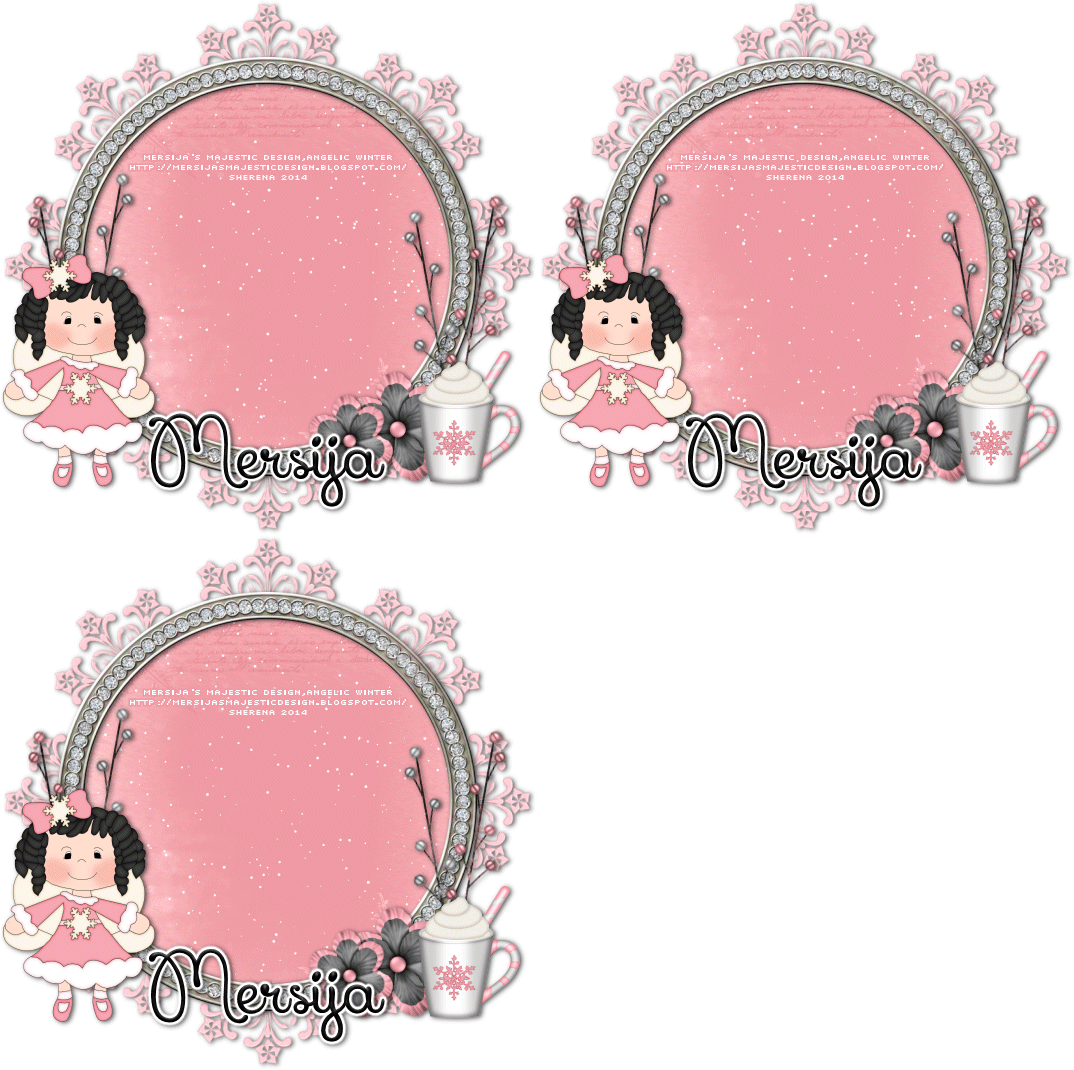
Angelic Winter PTU Tut

Supplies Needed:
PSP: I used PSP9, but any version should do.
 Kit of Choice: I used Angelic Winter by Mersija's Majestic Design. You can find where to buy it here.
 Tube of Choice: I used the adorable angel that came with the kit.
 Font of Choice: I used I used Xiomara. You can find it here.
Plugins: VDL Snowflake here
Animation Shop
 
Let's get started!
 
 Invert selection & delete
Invert selection DO NOT DESELECT
Add 3 new layers above paper layer & name it snow 1, snow 2 & snow 3
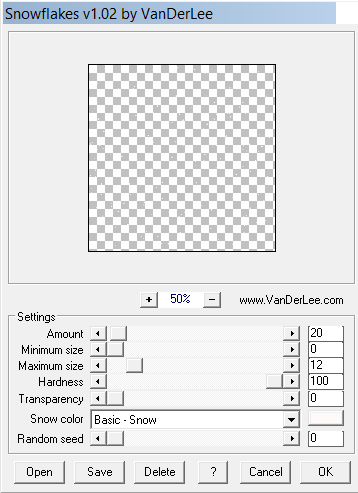
On snow 1: VanderLee Snowflakes with these settings:


On snow 2: VanderLee Snowflakes with these settings:
 
 
On snow 3: VanderLee Snowflakes with these settings:
 
Deselect

Add elements of choice
I used the following:
MMD_angel flying (2)- resize 15%
MMD_flower pink gray1- resize 12%; duplicate & resize 80%
MMD_Branch 3- resize 45%; free rotate left 10; duplicate & mirror
MMD_Branch 2- resize 45%; Mirror & free rotate right 10; duplicate & mirror
MMD_cocoa1- resize 6%
MMD_frame- resize 75%

Add DS where desired

Crop & resize
Add name & copyright

To animate:
Hide snow 2 & snow 3
Copy merged & paste in Animation Shop
Back in PSP, hide snow 1 & unhide snow 2
Copy merged & paste after current frame in Animation Shop
Back in PSP, hide snow 2 & unhide snow 3
Copy merged & paste after current frame in Animation Shop
In Animation Shop, select all & change frame properties to 20
View animation & save if happy

I would love to see your results! If you would like to share just send them to me: sherenassweettreats@yahoo.com 
Sunday, January 5, 2014

I joined a CT!

I'm excited to announce I have been asked to join Mersija's Majestic Designs' creative team! Mersija has some adorable kits and even some freebies. Check out her blog here. Be on the lookout for new tuts featuring Mersija's adorable kits!

Wednesday, January 1, 2014

Party Girl PTU Tut

Supplies Needed:
PSP: I used PSP9, but any version should do.
 Kit of Choice: I used 3,2,1...Happy New Year by Scrappin Krazy Designs. You can find where to buy it here.
 Tube of Choice: I used an exclusive tube from Pics for Design. You can  find it here. Please do not use without the proper license!
 Font of Choice: I used I used Xiomara. You can find it here.
   
Let's get started!
 
New canvas 600X600
C/P ele31 Resize 65%
Select inside each frame Expand by 3 & C/P papers of choice behind frames
(I used p04, p05, p10 & p11)
C/P your tube inside each frame Resize if needed
Erase any parts showing outside of frame
Change the blend mode & opacity on each tube
C/P tube to left of frame Resize if needed

C/P elements of choice
I used the following:
ele10- free rotate right 90, duplicate & flip
ele24- resize 45%
ele56- resize 45%
ele46- resize 45%
ele58- resize 45%
ele12- duplicate & flip

Add DS
 
Crop & resize
Add name & copyright
Save as .png & you're done!

I would love to see your results! If you would like to share just send them to me: sherenassweettreats@yahoo.com
Candy Girl PTU Tut

Supplies Needed:
PSP: I used PSP9, but any version should do.
 Kit of Choice: I used Candy Girl by Gimptastic Scraps.You can find where to buy it here.
 Tube of Choice: I used a tube by Ismael Rac. It was a bonus tube. You can buy his tubes here. Please do not use without the proper license!
Mask of Choice: I used  Mask15-Leah here.
 Font of Choice: I used Syncopate. You can get it here.
 
Let's get started!
 
New canvas 600X600
C/P Frame3 Resize 65%
Select inside frame with magic wand
Expand by 5
C/P paper of choice under frame (I used Paper10)
Invert selection & Delete
Deselect
C/P tube Resize if needed
Erase part of the tube showing on left side of frame so she appears to be "popping" out of the frame

C/P elements of choice
I used the following:
WA2- resize 75%
Teddy- resize 65%
Ribbon- resize  65%; free rotate right 90
Sundae2- resize 65%
Cupcake- resize 45%
Chocolate- resize 45%
Candy2- resize 45%
CandyRing- resize 45%
Candy3- resize 45%
WrappedCandy- resize 45%
Candy1- resize 45%

Add DS where desired

C/P paper of choice above background layer (I used Paper8)
Apply mask & merge group
Resize 90%

Crop & Resize
Add name, wordart & copyright
Save as .png & you're done!

I would love to see your results! If you would like to share just send them to me: sherenassweettreats@yahoo.com

Peach Loves Gold FTU Tut

Supplies Needed:
PSP: I used PSP9, but any version should do.
 Kit of Choice: I used Peach Loves Gold Mini by Mersija's Majestic Designs. You can find it here. This is part of a blogtrain, so be sure to grab all of the parts!
 Tube of Choice: I used a tube by PinUpToons. You can get it here. Please do not use without the proper copyright!
Mask of Choice: I used BD Mask Set 6-45 here.
 Font of Choice: I used Quilline Script Thin. You can find it here.
 
Let's get started!
 
 New canvas 600X600
Open MMD_paper 1 Resize 600X600
Set foreground to pattern & find your paper Background set to none
Select the Rectangle Tool Width 20
Draw out a rectangle to make your frame
Center in canvas & convert to raster
Add inner bevel of choice to frame
Select inside frame with magic wand Expand by 5
C/P paper of choice as a new layer below frame layer (I used MMD_paper rose)
Position, invert & delete
C/P closeup tube in frame
Delete & Deselect
Change blend mode to Luminance(L) & opacity to 45
C/P tube & position to right Resize if needed

C/P elements of choice
I used the following:
MMD_bow9- resize 12% & mirror
MMD_champagne- resize 20%
MMD_champagne glass- resize 12%
MMD_tulle-flower2- resize 25%
MMD_sparkles1- resize 45%, duplicate a few times & arrange

Add DS to desired layers

Add a new layer above background layer
Select all
C/P paper of choice into selection
Deselect
Apply mask & merge group
I used the Raster Deform Tool to adjust my mask

Crop & Resize
Add name, wordart & copyright
Save as .png & you're done!

I would love to see your results! If you would like to share just send them to me: sherenassweettreats@yahoo.com